Workshop ticket: booking repairs against an order
The workshop ticket: one repair service as a separate task for a technician — status, price, assignee, requester, comments and history
Updated
A workshop ticket is one repair service taken out as a separate task. If an order needs both a display restored and a board cleaned, there will be two tickets: each with its own technician, its own status and its own price. That way it is clear which work on the order is already done and which is still waiting for an assignee.
Contents:
You can reach a workshop ticket:
- Workshop panel → the ticket you need
- Order overview → the “Services on the order” table → the name of the repair type
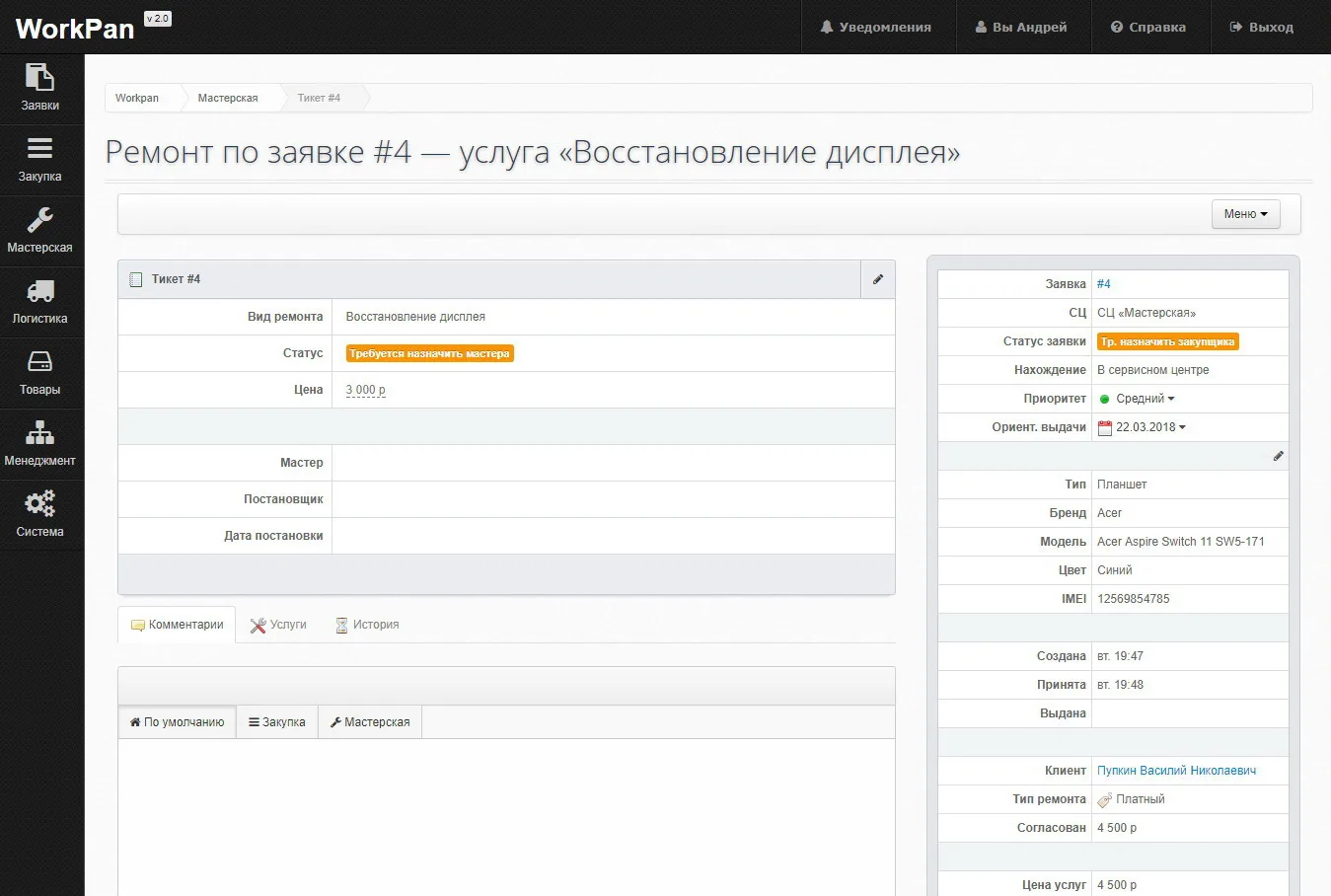
The ticket card
The page title names the order and the service: “Repair on order #4 — service ‘Display restoration’”. The card itself holds:
- Repair type — a service from the services reference book.
- Status — what the ticket requires. Until an assignee is chosen it reads “Assign technician”.
- Price — the cost of this work; the same figure goes into the order total.
- Technician — the person doing the repair.
- Requester and date requested — who put the work into the workshop, and when.
The pencil in the corner of the block opens the fields for editing; the “Menu” button gathers the actions available on the ticket.
The order panel
On the right, the summary of the order is repeated so the technician does not have to switch screens: the order number, service centre, status, device location, priority and estimated due date; below that the type, brand, model, colour and IMEI of the device, the intake and handover timestamps, the client, the repair type (paid or warranty), the amount agreed with the client and the price of the services.
Comments, services and history
Three tabs sit under the card:
- Comments — the correspondence on the ticket. It is split into the “Default”, “Purchasing” and “Workshop” threads, so that a discussion about buying a part does not get mixed with a discussion about the repair.
- Services — the composition of the work linked to the ticket.
- History — the change log: status changes, technician assignment, price edits.