Order overview
The card of a single order: tabs for enquiries, comments, tasks, finances, logistics and history, the services on the order and the client’s details
Updated
The order overview is the working card of a single order. Everything that happens to the device from intake to handover is gathered here: the composition of the repair, the money, the logistics, the correspondence and the full change history.
Contents:
- Opening the module
- Order tabs
- General information
- Device information
- Services on the order
- Client and pricing
You reach the order overview from the “All orders” list through the “More” button, or by the order number from any linked section.
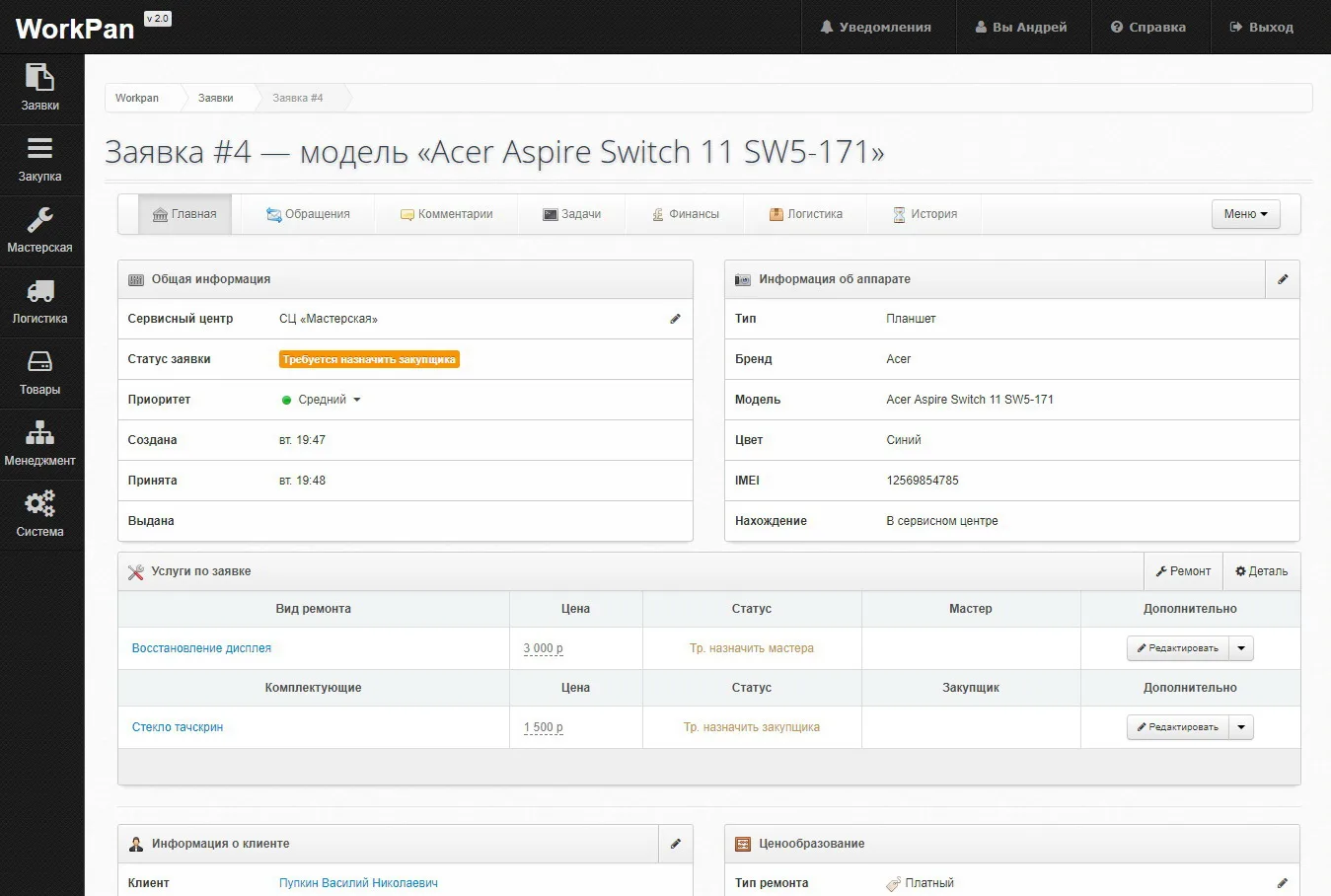
Order tabs
- Main — the summary of the order; it is the one that opens first.
- Enquiries — the history of contact with the client about this order.
- Comments — internal correspondence between employees.
- Tasks — assignments linked to the order.
- Finances — the movement of money on the order.
- Logistics — pickup and delivery of the device by courier.
- History — the change log: who changed what in the order.
The “Menu” button on the right gathers the actions available on the order.
General information
Top left is the state of the order: the service centre, the order status (what has to happen next), the priority, and the timestamps — when the order was created, taken in and handed over. Until the device is handed over, the “Handed over” field stays empty.
Device information
Top right is the device passport: type, brand, model, colour, IMEI or serial number, and the location — where the device physically is (for example, “At the service centre”). The pencil in the corner of the block opens the fields for editing.
Services on the order
The table has two parts:
- Repair type — the work on the order: price, status, assigned technician.
- Components — the parts for that work: price, status, assigned buyer.
The “Repair” and “Part” buttons add new work or a new component to the order. Until an assignee is chosen, the “Status” column holds a requirement — “Assign technician”, “Assign buyer”.
Client and pricing
At the bottom of the card are the client’s contacts and the “Pricing” block: the repair type (paid, warranty), the amount agreed with the client and the final price of the services.